

Virtual Machine or Container? (PART01)
A Journey Through the Evolutionary Paths of Computing: In the landscape of enterprise computing, technologies emerge, evolve, and transform at a pace that challenges even our imagination. Two paradigms have radically redefined how we design, deploy, and manage applications: virtualization and containerization. Where servers were once monoliths dedicated to single applications, today we speak of elastic, intelligent infrastructures capable of adapting with the agility of a living organism. This evolution goes beyond mere technical progress, it represents a profound cultural shift in how we conceive digital computing.
FIRST PAGENETWORKS AND DATA INFRASTRUCTURESINNOVATION AND EMERGING TECHNOLOGIES
A Journey Through the Evolutionary Paths of Computing
In the landscape of enterprise computing, technologies emerge, evolve, and transform at a pace that challenges even our imagination. Two paradigms have radically redefined how we design, deploy, and manage applications: virtualization and containerization.
Where servers were once monoliths dedicated to single applications, today we speak of elastic, intelligent infrastructures capable of adapting with the agility of a living organism. This evolution goes beyond mere technical progress—it represents a profound cultural shift in how we conceive digital computing.
1. Introduction: Charting Our Technological Expedition
The Historical Context
In the early 2000s, virtualization emerged as a silent revolution. A single physical server could now host multiple operating systems, fragmenting hardware resources with previously unthinkable elegance. Hypervisors—miraculous pieces of software—transformed rigid data centers into dynamic and flexible ecosystems.
But innovation didn't stop there. The past decade witnessed the rise of containers, a technology that shifted abstraction from the hardware level to the process level.
Objectives of the Analysis
This article aims to:
Thoroughly explore virtualization and containerization
Analyze the main technological solutions
Compare performance, security, and use cases
Provide guidelines for IT architects, system administrators, and decision makers
Overall Article Structure
The analysis will be divided into four main parts:
Part 1 – Introduction, Virtualization Fundamentals, Virtualization Platforms, Docker Architecture, Architectural Comparison.
Part 2 – Use Cases, Scalability and High Availability, Cost and Resource Analysis.
Part 3 – Security (VM vs Container), Adoption and Market Share, Linux vs Windows.
Part 4 – DevOps and Cloud-Native, Best Practices and Final Considerations, Appendices and Resources.
1.1. Article Context and Objectives
In the world of enterprise IT, we have witnessed a constant evolution in methods for distributing and managing applications over the years. In the 2000s, classic virtualization spread with virtual machines (VMs): thanks to a hypervisor, a single physical server could host multiple instances of different operating systems.
In the past decade, however, we witnessed a further revolution: containerization. Tools like Docker shifted the abstraction level from hardware (or hardware emulation) to process isolation on the operating system.
We will explore in depth:
How classic virtualization and containers work
The main virtualization solutions
Docker's characteristics as a containerization technology
Detailed comparisons on performance, security, costs, and use cases
Enterprise adoption, market trends, and preferences between Linux and Windows
Integration with DevOps and cloud-native architectures
The ultimate goal is to provide guidelines useful for IT architects, system admins, CTOs, and decision makers, enabling them to consciously choose the best application deployment strategy. A strategy that often combines virtualization and containers, rather than viewing them as mutually exclusive technologies.
1.2. Overview of Covered Technologies
Throughout this article, we will discuss:
Classic virtualization based on hypervisors:
VMware vSphere (ESXi): enterprise market leader, bare-metal type 1 hypervisor with a rich ecosystem of tools (vCenter, vMotion, DRS, HA…).
Microsoft Hyper‑V: included in Windows Server, also bare-metal (type 1), with a microkernel approach and native integration within the Microsoft ecosystem.
KVM (Kernel-based Virtual Machine): an open-source virtualization technology, an integral part of the Linux kernel, used by solutions like oVirt, Red Hat Virtualization, OpenStack, and by many cloud providers (AWS, GCP) in customized form.
Proxmox VE: an open-source platform based on Debian that combines KVM for VMs and LXC for operating system-level containers, providing a complete web interface and cluster/HA functionality.
Containerization:
Docker as the most popular container runtime and format.
Key features that differentiate containers from VMs.
The topic of orchestration (Kubernetes, Docker Swarm, etc.) as a natural extension when discussing containers in production.
1.3. Virtualization vs Containers: Why the Comparison Matters Today
In 2023-2025, virtualization is a mature and consolidated technology. At the same time, container adoption has become ubiquitous for new application development, thanks to their lightweight nature, fast startup, and integration with DevOps workflows (continuous integration and delivery, microservices, cloud-native design).
Companies often find themselves coordinating both approaches:
On one hand, VMs to isolate legacy applications or heterogeneous operating systems.
On the other, containers for modern apps, microservices, and rapidly evolving projects.
Understanding the fundamentals of both, and how to integrate them, becomes crucial for a long-term IT strategy. Furthermore, the cost aspect (hypervisor licenses, hardware overhead, specialized teams) has a decisive impact.
The emergence of open-source alternatives (like Proxmox for virtualization, and Docker/Kubernetes in the container space) has significantly changed the competitive balance with traditional vendors.
1.4. Comparison Methodology (Criteria)
To thoroughly analyze the differences and pros/cons between virtual machines and containers, we will use several criteria:
Architecture and operation: how hypervisors and container runtimes work.
Performance and overhead: impact in terms of CPU, RAM, I/O, startup speed.
Security: isolation level, potential vulnerabilities, best practices.
Scalability and High Availability: clustering mechanisms, failover, and auto-scaling.
Costs: licenses, Total Cost of Ownership (TCO), hardware investments, operational management costs, and expertise.
Use cases: situations where one technology or the other proves more suitable.
Market adoption: distribution statistics, Windows vs Linux preferences, DevOps and cloud-native integrations.
Each section will offer theoretical and practical insights, with comparative tables, updated data, and considerations based on real company experiences.
2. Virtualization Fundamentals
2.1 Basic Virtualization Concepts: Host, Guest, and Hypervisor
Virtualization is a revolutionary technology that enables the execution of multiple operating systems (called "guests") on a single physical hardware infrastructure (called "host"). This technological marvel is coordinated by a sophisticated software layer called hypervisor (or Virtual Machine Monitor, VMM), which dynamically distributes computational resources – including CPU, RAM, disk space, and network capacity – allocating them efficiently and in isolation among different virtual environments.
The hypervisor operates as a digital "orchestra conductor," managing with surgical precision the assignment and sharing of hardware resources, ensuring that each virtual machine has the necessary resources without interference or overlap with other environments.
The benefits historically associated with virtualization are multiple and profound:
Server consolidation: Significant reduction in the number of physical machines, optimizing hardware utilization and reducing infrastructure costs.
Operational flexibility: Ability to create, clone, and move virtual machines with previously unthinkable agility, without any impact on the underlying physical infrastructure.
Dynamic resource optimization: The hypervisor can implement sophisticated load balancing strategies and even "overcommit" resources, such as assigning virtual memory exceeding the available physical RAM, leveraging the intelligent assumption that not all virtual machines will simultaneously use their entire allocated memory.
Hardware-software decoupling: Radical simplification of machine lifecycle management, disaster recovery planning, and infrastructure scalability.
This technology represents much more than a simple technical expedient: it is a fundamental redefinition of how we conceptualize and manage computational resources, enabling elasticity and efficiency previously unthinkable in the world of digital computing.
2.2 Hypervisor Types: Type 1 vs Type 2
Hypervisors are traditionally distinguished into two fundamental categories, each with distinctive characteristics and deployment contexts:
Type 1 (bare-metal): These hypervisors represent the purest incarnation of virtualization, installing directly on hardware without the mediation of an underlying operating system. Examples of excellence in this category include VMware ESXi, Microsoft Hyper-V (integrated into Windows Server but operating essentially at the bare-metal level), Citrix XenServer, and Nutanix AHV.
Type 2 (hosted): Distinguished by a more "guest" nature, these hypervisors install as a software layer on a pre-existing operating system. Typical examples of this class are VMware Workstation, Oracle VirtualBox, and Parallels.
In complex enterprise data center ecosystems, the choice almost invariably falls on type 1 hypervisors. The reasons are crucial: superior performance, reliability, and a significantly more robust security profile, derived from minimizing software layers between hardware and virtual machines.
Conversely, in desktop environments or those dedicated to testing and development, tools like VirtualBox or VMware Workstation (type 2) maintain a central role due to their ease of use and flexibility.
2.3 Historical Evolution: From Mainframe to Cloud Computing
Virtualization is not a concept born with modern technologies; rather, it has roots in a technological past rich with innovations. Already in the 1960s and 70s, IBM was pioneering mainframe systems with sophisticated logical partitioning (LPAR), demonstrating a far-sighted vision of computational resource sharing.
The true turning point occurred in the early 2000s, when VMware made the execution of virtualized x86 systems practically feasible with significantly reduced computational overhead. The introduction of Intel VT-x and AMD-V CPU instructions subsequently revolutionized the landscape, introducing hardware-assisted virtualization as the de facto standard, which further optimized performance and reduced emulation load.
Today, virtualization is not simply a technology but the architectural foundation of virtually every cloud infrastructure, including giants like AWS and Azure. These providers have even developed custom hypervisors, such as AWS Nitro, based on KVM, representing the most advanced evolution of this technological paradigm.
2.4 General Benefits of Virtualization in Enterprise Environments
Companies have massively embraced virtual machines over the past 15 years for a series of strategic and operational reasons:
Total Cost of Ownership (TCO) reduction: Fewer physical servers mean lower purchase, maintenance, energy, and cooling costs. A direct and substantial economic optimization.
High Availability and Business Continuity: Features like vMotion (VMware) or Live Migration (Hyper-V) allow moving virtual machines "live" between different hosts, enabling hardware maintenance operations without any service interruption.
Simplified Disaster Recovery: The inherently software nature of VMs makes it incredibly easier to replicate, move, and restore environments to remote sites, significantly reducing recovery times and risks.
Provisioning Flexibility: Ability to quickly create new virtual machines for testing, development, training, or to handle seasonal load peaks, all with just a few clicks.
In summary, virtualization is no longer just a technology: it has become an essential infrastructure pillar for any data center aspiring to efficiency, resilience, and operational agility.
3. Overview of Virtualization Platforms
3.1 VMware vSphere (ESXi): The Enterprise Architecture
Technical Architecture: Beyond the Traditional Operating System Concept
VMware ESXi represents the most refined evolution of the hypervisor concept, based on a proprietary microkernel called "VMkernel." Unlike traditional architectures, ESXi breaks down the operating system paradigm, installing directly on server hardware with a minimalist and extremely efficient footprint.
Distinctive characteristics include:
Modular and highly specialized hardware drivers
Performance optimization at the individual clock cycle level
Security isolation intrinsic to the architecture
vCenter: The Orchestrating Brain of Virtual Infrastructure
vCenter Server is configured not as a simple management tool, but as a true operating system for virtual infrastructure. Its capabilities exceed basic administration:
Management of thousands of hosts in a single context
Orchestration of complex clustering
Dynamic balancing of computational resources
Revolutionary Features
vMotion: "Live" migration of virtual machines, a concept that redefines operational continuity
DRS (Distributed Resource Scheduler): Artificial intelligence applied to load balancing
HA (High Availability): Automatic failover with surgical precision
Snapshot: Instant capture of system states for recovery and testing
VMware Ecosystem: More Than Just a Hypervisor
VMware has built an enterprise ecosystem that includes:
vSAN: Hyperconverged virtual storage
NSX: Network virtualization and microsegmentation
vRealize: Suite for automation and monitoring
Tanzu: Native integration of Kubernetes platforms
3.2 Microsoft Hyper-V: Native Integration with the Windows Ecosystem
Architecture: Tightly Integrated Hypervisor
Hyper-V represents Microsoft's implementation of virtualization, a hybrid hypervisor that occupies a unique space between traditional models. A characteristic element is the Windows Server "parent partition," which hosts the I/O drivers, while a microkernel hypervisor operates at the lowest level.
Management Components
Hyper-V Manager: Intuitive graphical interface
PowerShell: Enterprise automation tool
System Center VMM: Solution for complex infrastructures
Strengths
Deep integration with Windows Server
Licenses included at no additional cost
Hybrid cloud-ready architecture
Failover Clustering for high availability
Cloud Strategy and Future Vision
Tight integration with Azure Stack HCI
Underlying architecture of the Azure public cloud
Native support for hybrid and cloud-native environments
3.3 KVM: When the Linux Kernel Becomes a Revolutionary Hypervisor
The story of KVM is a tale of disruptive innovation. Imagine it as a digital alchemist that transforms the Linux kernel into something more than a simple operating system: a hypervisor capable of multiplying computational power with disarming elegance.
The Architecture of a Silent Revolution
KVM is not simply a software module, but a philosophy of virtualization. Born from the intuition that the Linux kernel could be much more than a resource manager, it represents the apotheosis of the open-source movement: making powerful what was considered limited.
Its beating heart, the "kvm.ko" module, operates as an invisible director coordinating the execution of multiple virtual machines. Leveraging Intel VT-x and AMD-V virtualization extensions, KVM breaks down the boundaries between hardware and software, creating virtual environments that approach "bare metal" performance.
QEMU, its faithful companion, is not a simple emulator but an artist who recreates digital worlds. It emulates with surgical precision every hardware component: from the most obsolete BIOS to the most modern network cards, allowing the execution of completely isolated and independent operating systems.
Ecosystems and Metamorphosis
The true strength of KVM lies in its ability to evolve. It is not relegated to a single use but manifests in multiple forms:
In Red Hat data centers, where it becomes the foundation of entire cloud ecosystems
In Nutanix hyperconverged infrastructures, where it shapes extremely flexible computing environments
In Amazon and Google public clouds, where it is refined until it becomes almost unrecognizable
Its virtIO drivers are like simultaneous translators allowing virtual machines to communicate with hardware with previously unthinkable fluidity. Performance, efficiency, lightness: KVM redefines these concepts.
3.4 Proxmox VE: The Digital Craftsman of Virtualization
If KVM is the philosopher of virtualization, Proxmox VE is the craftsman who shapes this philosophy into concrete and accessible tools. Born from the Debian community, it represents the incarnation of a revolutionary idea: making enterprise technology accessible to everyone.
One Ecosystem, Infinite Possibilities
Proxmox is not just a hypervisor. It's a story of integration. KVM and LXC coexist in a dynamic balance, like two forms of digital life that complement each other. Virtual machines and containers intertwine on a computational dance floor, offering flexibility that leaves even the most experienced IT architects speechless.
Its web interface is a window into a world of possibilities: from complex clustering to storage management, everything is just a click away. But behind this apparent simplicity hides technical complexity worthy of the most refined enterprise architectures.
The Model of a New Paradigm
Proxmox challenges the traditional business model in the IT world. Its community edition is not a reduced product, but a complete and powerful ecosystem. Enterprise subscriptions don't sell software but an experience: guaranteed updates, professional support, the peace of mind of having a technology partner.
3.5 Beyond the Giants: Complementary Technologies
In the vast universe of virtualization, parallel worlds exist. Xen, Oracle VM, VirtualBox: they are not alternatives but different perspectives on the same digital reality. Each tells a unique story of innovation, adaptation, and technological survival.
The Future Is Already Here
The enterprise market converges but does not become uniform. VMware, Hyper-V, KVM: they are not competitors but interpreters of an increasingly complex technological orchestra. The real challenge is not choosing the best technology, but understanding which story to tell, which vision to implement.
Virtualization is no longer just a technology. It's a language, a way of imagining IT infrastructure as a living, fluid organism in continuous evolution.
4. Container Architecture with Docker
4.1. Basic Containerization Concepts: Isolation and Kernel Sharing
Containerization represents a revolutionary paradigm of process isolation at the system level. Unlike full virtualization, containers rely on native Linux kernel mechanisms that enable lightweight and efficient isolation.
Key elements of this approach include:
Namespaces: Mechanisms that allow each container to have an isolated "view" of system resources, controlling what each process can "see" and access.
Control Groups (cgroups): Tools for limiting, measuring, and isolating system resource usage, ensuring that no container can monopolize host resources.
Union Filesystem: Technology that enables the creation of "layered" images, where each layer is immutable and shareable, optimizing space usage and distribution speed.
The fundamental principle is kernel sharing: all containers on a Linux host share the same system kernel, eliminating the need to install a complete operating system for each instance.
4.2. Docker Engine: The Architecture Behind Containerization
Docker Engine represents the complete ecosystem for container management, composed of interconnected components:
Docker Daemon (dockerd): The central service that manages the creation, execution, and supervision of containers.
Docker CLI: The command-line interface that allows users to interact with the daemon.
Images: Read-only templates containing instructions to create a container, stored in public or private registries.
When a container is started, Docker assembles the read-only image layers and creates a temporary write layer, following the copy-on-write model.
4.3. Fundamental Technologies: Namespaces, Cgroups, and Overlay Filesystem
Delving into the underlying technologies:
Namespaces: Create an illusion of a completely isolated environment, where each container has its own view of network, processes, mount points, and users.
Control Groups: Implement a granular control mechanism over resources like CPU, memory, and I/O, preventing a single container from compromising the entire system's performance.
Overlay Filesystem: Allow efficient sharing of common layers between containers, loading base components like an operating system image only once.
4.4. Docker: Differences Between Linux and Windows Implementations
Docker implementations present significant differences between platforms:
Linux:
Native execution
Direct sharing of the host kernel
Maximum efficiency and lightness
Windows:
Two main execution modes:
Windows Server Containers: Sharing the Windows Server kernel
Hyper-V Isolation: Execution in mini-virtual machines for greater isolation
A crucial limitation: Linux containers cannot be run natively on Windows kernels, and vice versa.
4.5. Orchestration: Beyond the Single Host
Managing containers on a single machine presents obvious limits. Orchestration thus becomes essential:
Kubernetes: The de facto standard for managing containers on distributed clusters
Dynamic Pod scheduling
Auto-replacement of failed containers
Rolling updates
Dynamic network and storage management
Docker Swarm: Orchestration solution integrated into Docker, simpler but less widespread
5. Architectural Comparison: VM vs Container
5.1. The Evolution of Computational Stacks
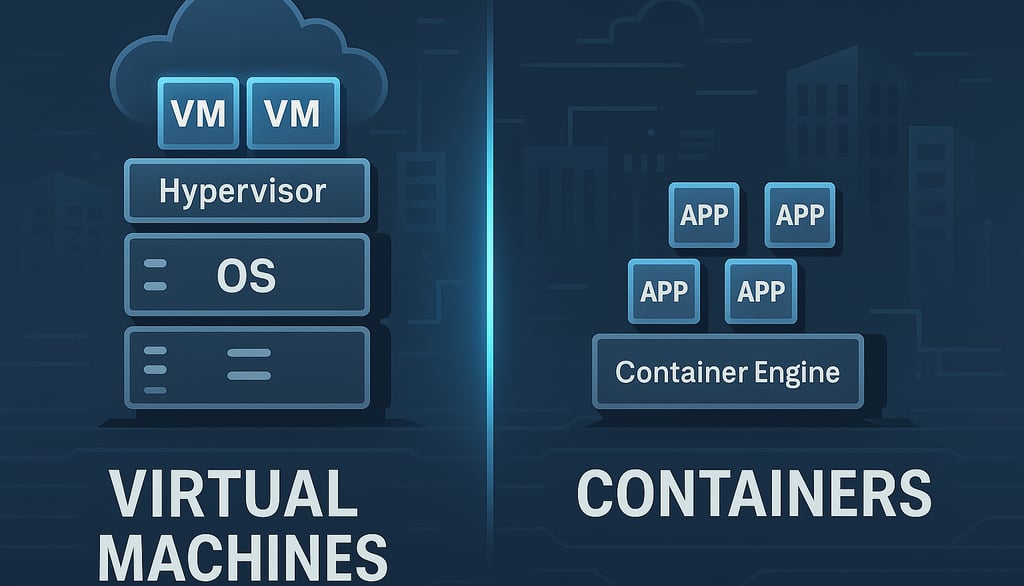
Imagine observing computational architecture as a continuously transforming ecosystem. Traditionally, virtual machines represented the dominant approach: a world of completely isolated systems, each with its own operating system, dedicated resources, and sharp boundaries.
Virtual machines build their world on a layered stack:
A fundamental hardware layer
A hypervisor that creates independent virtual worlds
Completely autonomous guest operating systems
Applications residing in these isolated universes
Containers, instead, propose an architectural revolution: a more fluid, lightweight, and interconnected approach. Their stack is essential:
Hardware as base
A single host operating system
A container runtime
Applications that share resources and kernel
5.2. Security as a Dialogue Between Isolation and Sharing
Security is no longer a wall, but a dynamic conversation between isolation and sharing. Virtual machines offer a traditional security model: impassable boundaries, where each instance is a world unto itself, protected by the hypervisor like a medieval moat.
Containers instead represent a more modern and multifaceted security philosophy. They use native kernel mechanisms to create isolated spaces, but with controlled porosity. They are like apartments in an intelligent condominium: separate but interconnected, with shared but customizable security systems.
5.3. Computational Resources: From Static to Dynamic Elasticity
In the VM world, resources are like fenced plots: each virtual machine is assigned a predefined allotment of CPU, memory, and storage. Waste is accepted as a necessary toll for isolation.
Containers subvert this model. They are more like a dynamic coworking space, where resources expand and contract in real-time. Linux cgroups become the architect of this flexible space, monitoring and regulating usage with surgical precision.
5.4. Networking: Networks That Breathe
Traditional virtual machine networking is comparable to a communication system with rigid boundaries: virtual switches, VLANs, port groups. Each VM has its own network card, like an apartment with its own strictly separate entrance.
Containers instead introduce a network that breathes and transforms. Default bridges, port mapping, network plugins in orchestrated environments like Kubernetes represent a living network, capable of dynamically adapting to application needs.
5.5. Storage: From Monolithic Persistence to Modular Flexibility
In virtual machines, storage is a closed world: dedicated virtual disks, full system backups, a state that resists and persists. It's like a library where every book is a complete and unmodifiable world.
Containers propose a revolutionary vision: storage as an ephemeral and reconfigurable service. Volumes and bind mounts become mechanisms for connecting persistent data to volatile containers. It's an approach that favors modularity and reconstructability over static preservation.
5.6. Overhead and Resources: Lightness as a Computational Philosophy
Virtual machines are heavy systems: several gigabytes of RAM for the operating system alone, slow startups, resources reserved but often underutilized. They are like bulky cars that consume fuel even when stationary.
Containers instead embody the ideal of computational lightness. They occupy hundreds of megabytes instead of gigabytes, start up in seconds, and can be packed onto a single piece of hardware with impressive density. They are agile vehicles, ready to move and reconfigure instantly.
5.7. Scalability: From Mechanical Growth to Organic Expansion
Scaling with virtual machines is a mechanical and slow process: clone, provision, wait minutes for new instances. It's like constructing new buildings, a long and complex process.
Containers introduce organic scalability: new instances in seconds, immediate horizontal expansion capability, architectures that breathe and adapt to load. They are no longer buildings but computational neural networks that expand and contract with intelligence.
6. Differences in Operation and Logic
6.1. Lifecycle: From Traditional Provisioning to Container Instantaneity
The comparison between virtual machine provisioning and containers reveals a radical transformation in deployment models:
A traditional VM requires an articulated process:
Definition of computational resources
Installation of a complete operating system
In-depth environment configuration
Installation of specific packages and software
A container, instead, follows a completely different path:
Selection of a pre-configured image
Quick download from the registry
Immediate instance startup
This difference translates into extremely more agile continuous deployment pipelines, where the entire environment is codified and immediately replicable.
6.2. Deployment and Updates: From Incremental Evolution to Immutability
In traditional virtualization environments, updates happen "in situ": patches and modifications are applied directly to the virtual machine. This approach carries significant risks, primarily the accumulation of divergent and hard-to-trace configurations.
Containers introduce a revolutionary paradigm: immutability. Each new release involves complete image rebuilding with updated dependencies, entirely replacing the previous instance through rolling updates.
This model certainly requires a mature DevOps ecosystem, but offers substantial advantages in terms of environment reproducibility and traceability.
6.3. Portability: From Complex Migration to Immediate Sharing
Virtual machines, while supporting exports in standard formats like OVF/OVA, remain "heavy" entities, with significant system dependencies and several gigabytes of footprint.
Containers instead embody the "build once, run anywhere" principle. Sharing happens through registries, enabling virtually instant portability, constrained only by container runtime compatibility.
For cloud-native architectures, this lightness represents a decisive competitive advantage.
6.4. Management: From Graphical Interface to Configuration as Code
While traditional virtualization platforms (VMware, Hyper-V) offer centralized graphical interfaces for administration, the container world embraces a diametrically opposite approach.
Management occurs predominantly through:
Command-line interfaces
Declarative configuration files (Dockerfile, docker-compose, Kubernetes manifests)
Infrastructure as Code (IaC) principles
This transition is not just a technical change, but a true cultural revolution in the approach to development and deployment.
6.5. Backup and Disaster Recovery: From Environment Replication to Data Management
In traditional virtualization systems, backup is a complete process that captures the entire virtual machine: disk, state, and configurations. Tools like Veeam allow complete restorations, but with often complex and time-consuming procedures.
In the container world, the very concept of backup is transformed:
The container is considered ephemeral
Attention shifts to persistent data
Recovery becomes a process of infrastructure reconstruction and volume recovery
This philosophy enables rapid restorations and greater overall resilience.
6.6. Performance and Optimization: From Hardware Control to Kernel Efficiency
Traditional hypervisors offer sophisticated optimization mechanisms: memory ballooning, memory deduplication, advanced CPU schedulers.
Containers, operating directly on the host kernel, offer an even more precise level of granularity and control:
Precise limits on CPU and memory
Potentially reduced latencies
Greater resource efficiency
However, there remain specific scenarios – such as High Performance Computing or environments with particular kernel requirements – where virtual machines maintain a competitive advantage.
Partial Conclusions
The evolution from traditional virtualization to containerization is not simply a technological change, but a systemic transformation in IT infrastructure development, deployment, and management models.