

Virtual Machine or Container? (Part.2)
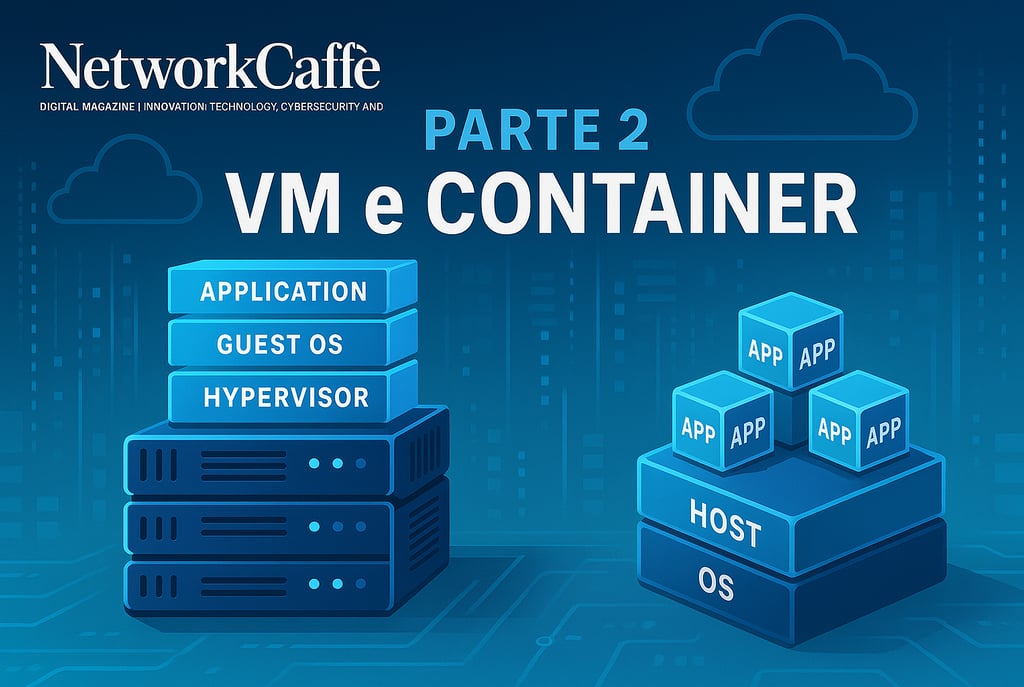
In every server room around the world, a question lingers in the air-conditioned atmosphere: Virtual Machine or Container? It's like choosing between a solid SUV and an agile sports car, both will get you to your destination, but in profoundly different ways. The dilemma doesn't admit universal answers, but offers well-defined scenarios that guide this strategic choice. In large modern organizations, these technologies often peacefully co-exist, like different neighborhoods in an evolving metropolis, each with its own character and function. Let's explore when it's best to opt for one or the other solution.
FIRST PAGENETWORKS AND DATA INFRASTRUCTURESINNOVATION AND EMERGING TECHNOLOGIES
The Dance of Systems
When and How to Choose Between VMs and Containers
7. Technological Duel: VM vs Container in the Enterprise Arena
In every server room around the world, a question lingers in the air-conditioned atmosphere: Virtual Machine or Container? It's like choosing between a solid SUV and an agile sports car — both will get you to your destination, but in profoundly different ways.
The dilemma doesn't admit universal answers, but offers well-defined scenarios that guide this strategic choice. In large modern organizations, these technologies often peacefully co-exist, like different neighborhoods in an evolving metropolis, each with its own character and function. Let's explore when it's best to opt for one or the other solution.
7.1. When Virtual Machines Take Command
Legacy applications: when the past demands respect That ERP from the '90s or that Windows application written in classic .NET Framework weren't born to swim in the ocean of containers. These software systems, like elderly citizens accustomed to their own home, need a familiar environment. Traditional virtualization offers exactly this: a faithful replica of the classic server environment, guaranteeing uncompromising compatibility and reassuring isolation. When the application requires specific kernel dependencies, proprietary drivers, or a local graphical interface, or simply doesn't understand "stateless" architecture, a dedicated VM becomes not only the simplest solution but sometimes the only viable one.
Operating system diversity: the digital Tower of Babel When your organization must orchestrate a concert between different operating systems (Windows, Linux, BSD...), VMs are like universal translators. Unlike containers, which speak only one native language (a Linux container will never naturally dialogue with Windows), a hypervisor is polyglot by design. On a single physical host, you can create Windows, Linux, BSD islands that coexist in perfect harmony, each with its own digital dialect.
Categorical isolation: fortresses in a hostile world In environments with external clients or internal teams that aren't fully trusted, isolation becomes an absolute priority, like a bank vault. VMs offer rigid security perimeters: an exploit in the hosted operating system will rarely contaminate the host. In containers, however, a vulnerability in the shared kernel could potentially open a breach in the entire ecosystem. When security admits no compromises, VMs build thicker walls.
Hungry workloads: when resources aren't shared Certain software, like enterprise databases or high-intensity scientific processing, are like professional athletes: they require a dedicated environment, optimized for their specific needs. Although privileged containers or containers isolated in mini-VMs exist (Hyper-V isolation, Kata Containers), when a critical workload demands categorical resource guarantees, the VM remains the consolidated approach, proven by years of field experience.
Vendor support: when the manual says "VM" Some vendors (Oracle, SAP, proprietary ERPs) may respond "Not supported" if their product runs in a container. Support guidelines often explicitly cite "official OS in VM or bare metal" as the only certified scenario. When compliance with these contracts is imperative, staying on VMs becomes a necessity, not a choice.
Compliance and auditing: when regulators want certainty Security standards like PCI-DSS or HIPAA have consolidated procedures for VM environments, while containers require more creative interpretations or additional controls. Even audit log management and antivirus scans follow well-defined paths in VMs, where traditional agents can be installed. In the container cosmos, different tools are needed, sometimes still in maturation phase.
Existing infrastructure: when the past weighs on the future If your company has invested significantly in platforms like VMware vSphere, with multi-year licenses, integrated storage (vSAN), backup (Veeam), and trained personnel, the leap to containers might seem like diving into the void. Migration requires new skills (Docker, Kubernetes, CI/CD) and a cultural shift (DevOps). When the advantages of change aren't crystal clear, preserving the status quo on VMs can be the most prudent path, especially for stable applications that don't change frequently.
7.2. When Containers Take Flight
Microservices and cloud-native: the art of divide and conquer Microservice architectures (12-factor apps), undisputed protagonists of the web and mobile world, find their natural habitat in containers. This symbiosis enables electrifying horizontal scalability: each microservice becomes a Lego block that can be replicated as a container in seconds, elegantly orchestrated by Kubernetes or similar platforms. Containers not only host these microservices but amplify their intrinsic advantages.
CI/CD and testing: perfect volatile laboratories In DevOps workflows, containers are like disposable lab coats: they make it incredibly easy to create and destroy isolated environments for integration tests or QA scenarios, ensuring absolute consistency with production. "It works in a container" means eliminating at the root the surprises due to environmental differences between local development and production servers, that "but it worked on my computer!" that has tormented developers for generations.
Density and efficiency: the art of digital compression When you need to orchestrate dozens or hundreds of instances of small services, containers shine with their own light: extraordinarily lighter in terms of RAM and CPU compared to VMs. A server with 32 GB of RAM could comfortably host 50 Node.js containers, while it would struggle to support 5-6 complete VMs with all their related services. It's like comparing a digital library with a physical one: with equal content, the former occupies a fraction of the space.
Immediate horizontal scalability: real-time elasticity During sudden load peaks (e-commerce during holidays, viral web services), launching new containers takes just seconds, while starting fresh VMs would require precious minutes. In "autoscaling cloud" contexts (AWS, Azure), containers have become the de facto standard for breathing at the frenetic pace of demand, expanding and contracting almost instantaneously.
Multi-cloud portability: traveling light A Docker container is like a universal passport: the same image will work indistinctly on a laptop, on a corporate server, on a cloud VM. This exceptional portability favors agile multi-cloud strategies (you can casually migrate containerized applications from one cloud to another, with the only constraint being a compatible runtime like Docker or containerd).
Frequent updates: changing clothes without interruption If an application requires frequent releases, containers enable nearly instant rolling updates and rollbacks, like changing tires on a moving car. Orchestrators (Kubernetes, Docker Swarm) orchestrate a perfect dance: gradually starting new containers with version 2.0 while shutting down those with version 1.9, without the user perceiving the slightest interruption.
Ephemeral services: when temporary is virtue Development environments for new programmers, tests on experimental libraries, short-duration batch analyses: scenarios where containers shine like fireworks. You avoid the weight of VM provisioning and the overhead of complete operating systems, creating containers that live only as long as necessary to complete their task, then dissolve without leaving a trace.
7.3. Borderland: When Choices Aren't Binary
Databases: the persistence dilemma Some relational databases (Oracle, MS SQL, PostgreSQL) can technically run in containers, but many organizations prefer the comfort of a dedicated VM, to manage memory and storage with a firm hand. On the other hand, with "cloud-native" databases (MongoDB, Cassandra) we often find dedicated Kubernetes "operators" that manage clustering in containers with surprising effectiveness. The choice depends on the specific database and the maturity of the operations team.
Microsoft .NET applications: the metamorphosis in progress With the advent of .NET Core, many .NET applications can thrive in Linux or Windows containers. If a company manages a legacy application park on .NET Framework 4.x, containerizing it is possible (in Windows containers) but more complex. The decision is based on the ease of re-engineering and the strategic vision: maintain everything on Windows VMs or embrace the new paradigm?
VDI (Virtual Desktop Infrastructure): virtual desktops VDI solutions (VMware Horizon, Citrix Virtual Apps & Desktops, Microsoft RDS) generally require Windows VMs with graphical capabilities. It's a territory where containers rarely venture. Containers that encapsulate single GUI applications exist, but for complete desktops, the classic hypervisor or RDS sessions remain the preferred solutions, like a tailored suit compared to off-the-rack clothing.
Monoliths with containerized appendages: the evolutionary hybrid An organization might maintain the application core on VMs, while developing new APIs or containerized microservices in parallel that integrate with the existing system. This "hybrid approach" is the signature of gradual digital transformations: part of the monolith persists in VMs, while new components are born already in containers.
Strategic coexistence: the best of both worlds An increasingly frequent scenario: the organization maintains a VMware/Proxmox cluster with a pool of physical hosts. On some strategic VMs operates Kubernetes, which in turn orchestrates containers. This way the advantages of VMs (infrastructure high availability, perimeter security) combine with those of containers (agility and rapid deployment).
7.4. Case Studies: When Theory Meets Practice
Alpha Bank: conservation and innovation in balance Core banking remains anchored to mainframes and VMware: not converted to containers due to rigorous compliance constraints and absolute stability. In parallel, the new mobile banking service pulsates with microservices and Docker on Kubernetes clusters: continuous releases, adaptive autoscaling based on load. The result? A two-faced architecture: maximum agility for the external digital part, solidity and conservative approach for the legacy transactional core. Like a hybrid vehicle, each engine does what it does best.
Beta E-commerce: seasonal elasticity It operated with an entirely VMware datacenter, but needed to scale rapidly during events like Black Friday. It introduced Docker on AWS (ECS and subsequently EKS) for the web front-end and some strategic microservices, maintaining internal management systems in VMware. Today it synchronizes data between the two environments, optimizing costs in low season (contracting cloud containers) and preserving proprietary infrastructure for essential services. Economic flexibility becomes competitive advantage.
Gamma Software House: client adaptability It adopted containers in Development/QA for rapid and repeatable tests. In production, some conservative clients require Windows machines + SQL Server in VMs, others embrace Linux containers on cloud. The solution: CI/CD pipelines with scripts that generate both Docker images and VM templates, offering complete flexibility to the end client. Adaptability becomes their trademark.
8. The Art of Resilience: Scalability and High Availability
One of the fundamental reasons for adopting virtualization and containers is building infrastructures that grow with needs and survive failures. Like digital Phoenixes, capable of rising from their own ashes.
8.1. Scalability in Virtual Cathedrals
Clusters and Hosts: Unity is Strength
In ecosystems like VMware, Hyper-V, or KVM, physical servers merge into organic clusters. The administrator can expand this organism by adding new nodes, increasing overall capacity in terms of CPU/RAM.
VMs distribute themselves across nodes like inhabitants of a city, and can "migrate" to optimize load balancing.
VMware: The Automated Orchestra
DRS (Distributed Resource Scheduler): an automatic orchestra conductor that redistributes VMs among available hosts, evaluating real-time utilization metrics. When a host suffers under load, DRS gently transfers some VMs (live migration) to less stressed nodes.
HA (High Availability): a vigilant sentinel that, if a physical host collapses, restarts orphaned VMs on other nodes. This involves a brief restart (the guest OS boot time), with a few minutes of interruption, but the application never remains permanently offline.
Hyper-V: The Microsoft Guardian
Hyper-V organized in Failover Cluster constantly monitors node status. If one succumbs, VMs are immediately reassigned.
Microsoft also offers "Replica" (asynchronous VM replication to alternative sites) for more complex Disaster Recovery scenarios.
The Open Source Alternative
In Proxmox, configuring a cluster with shared storage repository (like Ceph), high availability becomes reality. In case of node malfunction, VMs marked as critical are automatically reborn on other nodes.
The equivalent of vMotion is live migration based on QEMU/KVM, provided the disks are accessible from all nodes.
Two Growth Philosophies
With VMs, you often "scale vertically," assigning more resources (vCPU, RAM) to a single machine. Alternatively, you clone new identical VMs behind a load balancer (horizontal scalability).
Auto-scaling mechanisms for on-premises VMs are rare, since launching supplementary VMs requires planning, and orchestration tools (vRealize Automation, SCVMM) can be complex to configure and maintain.
8.2. Scalability in the Container Universe
Kubernetes: The Ultimate Orchestra Conductor
Containers are almost always orchestrated with tools like Kubernetes, Docker Swarm, or Red Hat OpenShift, true digital nervous systems.
Kubernetes organizes nodes into an intelligent cluster: if a container stops unexpectedly, Kubernetes restarts it; if an entire node falls, Kubernetes redistributes the "Pods" to other machines, like a general rapidly repositioning troops.
Intelligent Horizontal Scalability
Kubernetes' Horizontal Pod Autoscaler (HPA) can dynamically increase or decrease the number of service replicas based on real-time metrics (CPU, RAM, or custom parameters).
Starting new containers takes just seconds if the image is already present on the nodes, making temporary peak management almost instantaneous.
Intrinsic High Availability
Instead of restarting the same VM on another host (traditional approach), in containers multiple replicas are maintained simultaneously active. If one replica freezes, the others continue serving requests without interruption, while the orchestrator silently starts a new one.
This model of "active redundancy" allows self-healing times measurable in seconds, not minutes.
Lightning Recovery
Starting a container often takes less than a second (depends on the application). Consequently, high availability becomes almost imperceptible: instead of facing downtime to restart an entire operating system, the orchestrator generates a replacement container on another node.
Updates Without Interruption
Kubernetes and similar platforms allow updating containers one at a time, keeping the service constantly available. In case of problems, rollback to the previous image happens with the same fluidity.
In VMs you can implement "in-place" updates with snapshots, but managing continuous releases at scale becomes a complex logistical undertaking.
8.3. Temporal Comparison: Speed is Everything
The Sudden Peak Scenario
When an e-commerce site experiences an unexpected traffic spike, with VM architectures it would be necessary to "turn on" supplementary machines, wait precious minutes for boot, and manually configure the load balancer.
With containers and Kubernetes HPA, expansion happens almost automatically: "Add 5 containers" becomes reality in seconds, while the infrastructure adapts to the new load like a living organism.
Physical Limits Remain
Naturally, containers too are subject to the laws of physics: if all cluster nodes reach saturation, it will be necessary to add new hardware or cloud VMs.
But deploying new containers is generally faster and more flexible, especially in a cluster already sized with adequate safety margins.
8.4. High Availability and Fault Tolerance: Survival Strategies
HA Approach in VMware Clusters
If a physical host disconnects, within 1-2 minutes VMs are identified as offline and restarted on other nodes. This involves a brief interruption (guest OS restart time).
With VMware Fault Tolerance (FT) it's possible to maintain a twin VM in constant synchronization with the primary machine. If the main host fails, the shadow VM takes over instantly. However, FT introduces significant overhead and isn't always applicable.
High Availability in Kubernetes
Kubernetes strategically maintains N replicas in parallel. The loss of a container (or an entire node) doesn't compromise the service, since the other replicas continue operating without interruption.
The concept of "restart on alternative node" is completely automated, and containers regenerate in seconds, drastically reducing perceived impact.
Disaster Recovery: Planning the Unthinkable
In VM architectures, storage replication and cluster configuration in a secondary site (DR) are typically implemented. In case of disaster, the replicated VMs are "awakened."
With containers, data can be replicated on distributed storage (Ceph, Gluster, EBS multi-AZ in cloud) and Kubernetes definitions kept in Git repositories. Recovery happens by recreating the cluster in an alternative location and mounting replicated storage.
In practice, containerized DR requires a "cloud-native" setup (where every configuration element is definable as code), but offers potentially faster and more flexible restorations.
In summary: traditional virtualization provides high availability at the infrastructure level (VM restart if host falls), while containers adopt a model of active redundancy at the application level (multiple parallel instances). In the first case, if a VM stops there's a restart (with brief downtime); in the second case (containers), the loss of an instance goes unnoticed, provided the application is designed according to distributed resilience principles.
9. The Economic Equation: Beyond License Prices
In the battle between VMs and containers, budget is often the decisive factor. However, the true cost goes well beyond license prices: like an iceberg, it hides beneath the surface the hardware costs, necessary skills, and daily maintenance.
9.1. The Variable Geometry of Licenses
VMware vSphere:
The Premium-Priced Leader
License calculated "per socket" or "per CPU," with progressive editions (Standard, Enterprise, Enterprise Plus), each with increasing features and costs. Enterprise Plus, including DRS and unlimited vMotion, can cost thousands of euros per socket. vCenter and annual support costs (SnS) must also be considered. The acquisition by Broadcom (2023) brought price increases and strategic uncertainties, pushing some organizations toward open-source alternatives.
Microsoft Hyper-V:
The Ecosystem Strategy
Integrated in Windows Server, with Windows Server Datacenter licenses that theoretically allow unlimited Windows VMs on the same host. The "free" Hyper-V Server was abandoned after Windows Server 2019, directing customers toward Azure Stack HCI. It's more convenient in Windows-centric environments, but for multi-OS ecosystems, features remain comparable with lower market penetration.
KVM:
The Power of Open Source
Completely open source and integrated in the Linux kernel, with no direct license costs. Organizations can opt for enterprise distributions like Red Hat or SUSE, paying the subscription, or contract external support. The absence of an "official price" can mask higher personnel costs if internal Linux expertise is lacking.
Proxmox VE:
The Emerging Outsider
Free and open source, with optional subscription costing a fraction of VMware per socket/year. Popular in SMBs, academic environments, and budget-limited contexts, it's progressively establishing itself in enterprise environments too.
Containers (Docker & Kubernetes):
The Economic Revolution
Docker CE is free, while Kubernetes is completely open source. Enterprise solutions like Red Hat OpenShift or VMware Tanzu have specific cost models. The crucial advantage: containerization eliminates the need for OS licenses for each container. On a Linux host, the only potential license is that of the host system, radically lowering total costs compared to 100 VMs with Windows licenses.
9.2. The Economy of Resources: How to Avoid Waste
The Invisible Overhead of VMs
Each VM loads a complete operating system, with significant RAM, CPU, and storage consumption. An application requiring 1 GB of RAM might need 2-3 GB in a VM. The hypervisor adds contained overhead (5-10%), while overcommitment is possible but requires careful planning.
Containers: Density as a Strategic Advantage
A container loads exclusively the libraries essential to the application, without a separate kernel. On a single host, it's possible to orchestrate dozens of containers without saturating resources, with dramatic hardware savings, particularly in public clouds where you pay per consumed resource.
Economy of Scale
Expanding a VMware cluster implies additional per-socket licenses, while with KVM/Proxmox expansion involves no incremental costs. In large-scale environments, this translates to substantial savings, especially for development/test infrastructures.
9.3. Human Capital: The Hidden Investment
Skills: The Invisible Currency
VMware and Hyper-V are consolidated technologies with broad availability of expertise. KVM/Proxmox require deeper Linux knowledge, while containers and Kubernetes need specialized DevOps skills (Dockerfile, Helm, kubectl). These professionals are highly sought and well-compensated, making their recruitment a considerable investment.
Continuous Maintenance: The Cost Over Time
With 500 VMs, both the hypervisor and every guest OS must be kept updated, a significant operational burden. With containers, management shifts to the image level, simplifying updates but requiring automated build and image security processes.
The Tool Ecosystem: The Cost of Integration
In the VM world, mature backup, disaster recovery, and monitoring solutions exist that simplify operations, but often require additional investments. The container universe offers numerous open-source solutions that however need integration and configuration, or managed cloud services with consumption-proportional costs.
9.4. TCO (Total Cost of Ownership) at 5 Years: The Big Picture
Scenario 1: Infrastructure of 100 VMs
VMware: ~30k euros/year for licenses on 4 dual-socket hosts, plus hardware maintenance and guest OS licenses.
Proxmox: zero or a few thousand software cost with enterprise subscription, potential greater investment in training.
Hyper-V: Windows Server Datacenter licenses for 4 hosts (>20k euros, but potentially "included" in Microsoft EA contracts).
KVM (oVirt): open source, no direct license, but potential support and expertise costs.
Scenario 2: New Microservices
VM Option: 50 VMs on VMware cluster, with notable overhead, slow provisioning, and OS license costs.
Container Option: Kubernetes cluster on 3-5 physical nodes or VMs, with replicated microservices in containers. Lower hardware cost but investment in DevOps skills.
In many cases, the container option proves more convenient and scalable, especially for cloud-native applications.
Scenario 3: High-Availability Enterprise Applications
VM Approach: VMware cluster with HA/DRS, Enterprise Plus licenses, enterprise storage, Veeam backup. Significant five-year cost but with certified support and compatibility guarantees.
Container Approach: High-availability Kubernetes with distributed storage, open-source monitoring and backup. Lower license cost but higher investment in training and integration.
The economic gap narrows considering hidden costs: onboarding, internal documentation, certifications, and recovery procedures.
Scenario 4: Hybrid Cloud-On Premises Environment
Hybrid solutions benefit from technological uniformity, with containers offering the advantage of identical deployments in cloud or locally.
Savings extend to strategic flexibility of moving workloads in response to changes in market conditions or pricing models.
Conclusions
In the battle between containers and VMs, there is no universal winner. The most evolved organizations have understood that true wisdom resides in strategic coexistence.
Toward a Stratification Model
The mature approach involves intelligent stratification:
Infrastructure level: hypervisor on physical hardware, for isolation and base resource management.
Application level: containers orchestrated on selected VMs, for agility and scalability.
Special islands: dedicated VMs for legacy workloads, critical databases, and services requiring total isolation.
The Guiding Questions
At decision time, consider:
Does the application require a specific operating system?
Is complete hardware isolation necessary?
How important is portability between environments?
How frequently will the application be updated?
What skills are available in the team?
Are there determining compliance constraints?
The Future is Fluid
The technological landscape continues to evolve with technologies like "micro-VMs" (Firecracker, Kata Containers) and immutable operating systems for containers (NixOS, Flatcar Linux, Talos).
The winning company won't be the one that dogmatically chooses a technology, but the one that builds a flexible architecture, capable of integrating innovation without sacrificing stability and security.
In this evolutionary journey, containers and VMs are complementary allies in building resilient, efficient digital infrastructures ready for future challenges.